i have set up an arrangement for small orchestra and, once work had begun, I realized that 2-3 instruments were useless; therefore, I would like to remove them from the score without having to rewrite everything from scratch. How can I do this?
Activate the menu that manages musical staves (icon with the treble clef); small squares will appear near each staff (and each group); select the ones you are interested in and then right-click; from the drop-down menu that appears, you can decide whether to delete or hide them.
same procedure, except after you have activated the tool you must go to the new menu that appears on the menu bar and there you will find the new function or new with wizard....
I would like to ask you one more thing that is transversally linked to what has been said so far.
Finally, after much second-guessing, I have set the definitive score: 17 staves (of which 4 relate to 2 pianos).
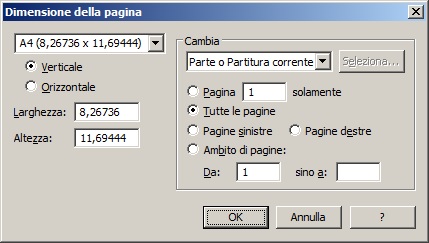
Now, my problem is that if I go to print even just one page, I end up with a "tiny" score, difficult to read (from the conductor's point of view). How can I adapt it to the proportions of an A4 sheet so that it is more easily readable?
By 'configura pagina', do you mean "page setup" which is found among the FILE options?
G
Gerardo
Member
Reply 9 by Gerardo
Posts
277
Try pressing the icon I am proposing to you in the image and access the configure page menu (I think page layout in English), and then page size (I think page size) in English.