

Hello everyone =) I have a curiosity! In Logic, is there the possibility to change the various sounds of the drum kits? I mean, can I have the snare from one kit, a tom from another, and so on?
Thank you =)
Started by
Jackoff
Member
Member
Hello everyone =) I have a curiosity! In Logic, is there the possibility to change the various sounds of the drum kits? I mean, can I have the snare from one kit, a tom from another, and so on?
Thank you =)

Administrator
Unfortunately no, or rather you should sample them but it becomes a lottery; basically, you would have to bounce every single sound that interests you and create a multitrack drum kit. You can do the same thing by loading the different samples from which you want to take the sounds.
I hope I was clear; if I wasn't, feel free to ask...
Member
yes yes =) I understood the general idea! it's a shame because being able to do something like that would be useful! =)
Thanks a lot for the help! =)
Administrator
I know, unfortunately the limitation is dictated by the fact that the sounds are contained in libraries; one could load different libraries inside a VST and render the MIDI signals by splitting them between the two libraries and the sounds you need, but things start to get complicated. I mean, in the end, you find a way to do everything, but honestly, I have never had a need to take these strange detours; I have a powerful system that I work on, so I can even open 10 tracks just for the drums, distinguishing a tom, the snare, the splash, the kick, the hi-hat for each track... and problem solved. You have to opt for more complex solutions when the system cannot keep up with you and therefore you have to get creative to make everything work...
Administrator
How silly, while answering another user's question I thought of a trick to solve your problem too. You can do an in-place bounce of the single sound and use EXS24 as a sampler; this way, it's as if you were making your own custom library. If you're interested, I'll explain how to do it.
Administrator
Look, I found a video that explains how to use EXS24 as a sampler... You can find it in this other discussion
If you have any further problems, feel free to ask...
Member
Very interesting!! =) thank you so much for your availability!! the video was very useful to me! even though obviously I still have many things to learn =) thanks again! =) in the meantime I will try using it, if I have any doubts I will ask =)
Administrator
You're welcome, don't mention it, we are here... But try not to let yourself be seen only when you have doubts...
Member
Hi =) sorry for coming back to bother you, contrary to what you said "only when I need it", but I don't have internet access very often =)
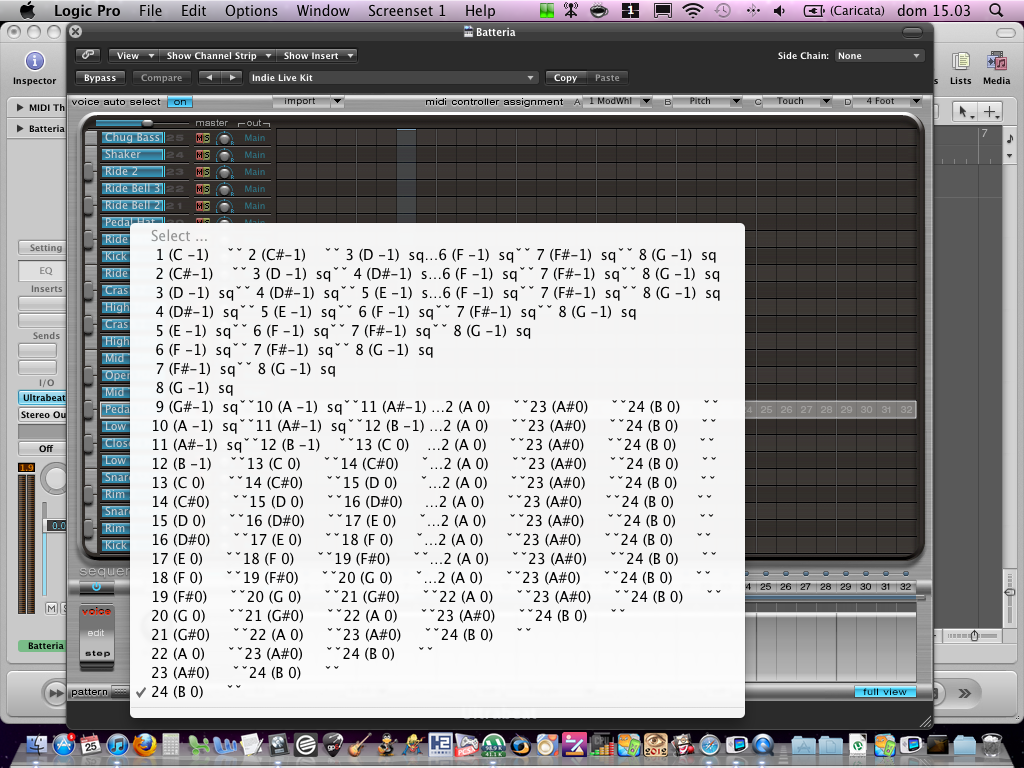
I wanted to ask you, always on Ultrabeat when I go to choose one of 24 patterns, I find them already written (and here it is normal, it seems to me that some are predefined and others are to be written) only they have strange names.. I know they aren't very clear but I am attaching a screenshot =) I hope you can explain to me what it means =) thanks for your kindness =)
Administrator
I think yours is a bug... you should only have the 24 patterns... If you find the text 'sq' near a pattern, it means there is data written inside. (c-1) - (c#-1) etc. is the MIDI notation to call a specific pattern from the track in the arrange window, so every pattern has its own MIDI notation. If you write the note corresponding to the pattern in the Ultrabeat track in the arrange window, the Ultrabeat will start playing that pattern; by changing to another note, the pattern changes (you must activate pattern mode at the bottom). Remember that you can still modify any existing pattern however you want... Regards
Member
ok! thanks so much =) it was a curiosity since seeing a tutorial on youtube these symbols were not present! =) thank you again for your availability.
Administrator
You're welcome !