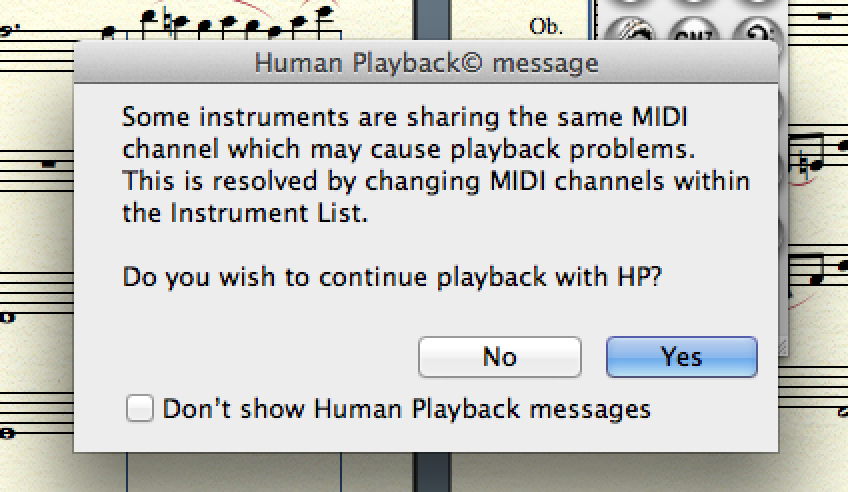
I am a fairly experienced and frequent user of Finale, and since I started, I have always used the 2005 version for convenience (and because it is known that Finale becomes more complicated with every update). I recently purchased a Macbook Pro Retina and rightly felt it appropriate to at least install one of the most used and successful versions, to be "up to date" despite us being in 2014. After receiving various pieces of advice, I chose to install the 2012 version in English, which is not a problem for me. Thus, from the very beginning, the most relevant problem I have encountered—given that all in all it seems I am dealing with the classic Finale platform—is the playback listening or, to simplify, listening to what I compose or write via the classic score playback tool. Apparently, from what I can gather from my somewhat green experience with the MAC world, the problem seems to be a conflict that prevents HUMAN PLAYBACK and MIDI settings from performing the auto-configuration necessary for their correct functioning. The message that appears every time I click play is reported in English in the image I posted, which literally says:
"Some instruments share the same MIDI channel, which may cause playback problems. This can be resolved by changing the settings within the instrument list. Do you want to continue playback with HP?"
I am exhausted from searching for a resolution to the problem and discouraged by my temporary inexperience with the Macbook.
I kindly ask anyone who has encountered the same problem or anyone who is an expert to give me some tips, helping me step-by-step to find the solution to the problem.
Thank you all in advance.
E
Exit
Member
Reply 2 by Exit
Posts
88
Preliminary Question, what settings do you have on the HUMAN PLAYBACK?
Second thing, are you using Finale files created with previous versions, which you then convert, or new projects, created ad hoc in Finale 2012?
B
Bit
Member
Reply 3 by Bit
Posts
225
From the Midi/Audio menu, check if you have activated MIDI or VST. In the case that you are using VSTs, it is strange that you are getting this type of error. Also, check if you are not using the Smart Synths; in that case, you should change them... Finale 2012 can give you much better results
I would answer him "yes", indicating that you are no longer interested in this type of notification.
The point is this: if you insert MIDI commands into the score, these conflict with the "preset" ones from the HP (which you can obviously customize but not define specifically).
Since you definitely have the HP active, the software is just asking you what to do with the custom MIDI settings ... I know the literal translation is another one (the one you posted) ... but sometimes this error occurs also for the reason I described above.
I use midishare because of Open Music. If I open Finale when Open Music is already open (meaning the MIDI driver has already been allocated), Finale doesn't even finish starting before it warns me. Therefore, I am not certain that your problem is actually due to an overlap, but performing the suggested checks would already be very useful