Studio Recording

First approach to the world of MIDI - VST - etc.

13 replies 5,707 views

Started by

dalrmi

Member

Member

Opening post by dalrmi

Posts
13
City
Dalmine

Hello everyone, I recently had a QuietTime Magic Star silent system from PianoDisc installed on my upright piano and I am very happy with it; among other things, I discovered that it is possible to connect this system via MIDI to a computer to use sampled sounds (I believe they call them VSTs).

That said! Since I own an iMac, I saw that I don't need an audio interface because the Mac doesn't have the latency issues of its Windows PC counterpart.

So, I connected my system to the Mac via MIDI cable and launched a program with sampled sounds on the Mac; I have two: UVI Grand Piano (http://www.uvi.net/uvi_grand_piano_mac-app-store_en.php) and a demo version of Pianoteq (http://www.pianoteq.com/).

Ah, the Mac has a pair of BOSE Companion 2 Series II as external speakers.

I didn't like the result very much; I will try to explain better as best as I can.

If I play directly from the software, what I hear coming out of the computer speakers is excellent, full-bodied, deep; it really feels like listening to a grand piano.

If instead I use the piano (and therefore I believe I am sending MIDI signals to the PC which are then processed by the software), the result is:

1) the sound is very low and I have to practically turn up the audio level of the software, the Mac system, and the speakers to the maximum

2) the sound I hear coming out of the speakers is absolutely not excellent, full-bodied, or deep

In your opinion, what could this depend on? Could I have made a mistake in the connections?

From the little I know about MIDI, the Velocity parameter seems important to me, which if I understood correctly is the direct interpretation of how the piano key was pressed (and therefore the color, i.e., piano, mezzoforte, forte, fortissimo, etc.).

Is there any software for Mac that allows me to see the Velocity parameter on the computer once the key is pressed? Just to confirm that the MIDI signal transmission is correct.

This "new world" opening up to me fascinates me greatly, but it must satisfy me in terms of quality, otherwise...

Hoping I haven't written nonsense, I greet you and await your reply.

If I can, this evening I will try to record (with my iPhone) an example of the sound produced by the same key both from the software and from the piano via MIDI so that you can hear the difference.

Thanks, bye, Roberto.

http://www.uvi.net/uvi_grand_piano_mac-app-store_en.phphttp://www.pianoteq.com/

Administrator

Reply 2 by Thesimon

Posts
4,504
City
Ariccia, RM

It can depend on many things. Let us hear a recorded audio file. First, play with the mouse on the VST keyboard and let us hear a p and ff sound. Repeat the same thing playing the piano keyboard and we will try to understand what it might depend on.

Member

Reply 3 by dalrmi

Posts
13
City
Dalmine

Very well, during the weekend I will make this recording for you to listen to; in the meantime, it "seems to me" that the problem lies precisely in the transmitted MIDI signal. Pianoteq has the ability to show the parameters of the MIDI signal transmitted by the piano; in particular, what I see is that the Velocity parameter of the pressed key does not vary much in value from a key pressed softly or strongly, it settles more or less between 48-75 (+ or -),

And while it is true that playing a bit with Pianoteq's Velocity curve I managed to improve the emitted sound a little, I am studying on the website how to do it exactly and I believe this experience might also serve me for other VSTs (I would be leaning towards Synthogy Ivory II Italian Grand).

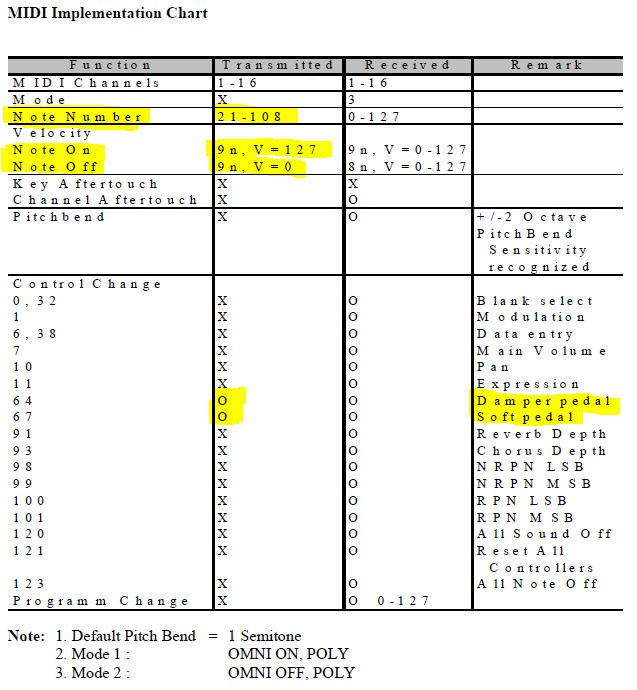
I am attaching the MIDI Implementation Chart of my Silent system and I have a few questions:

in the Note Number (Transmitted) section: I find 21-108; does this mean that notes from 0 to 20 and from 109 to 127 are not transmitted?

Velocity Note On: 9n, V = 127; can you explain what this means? I believe it is the speed with which the key was pressed on the piano and that it is therefore "mapped" by the VST reproducing a soft or loud sound; however, I don't understand what 9n means and does V=127 mean that all 127 velocity variations are transmitted?

Velocity Note Off: 9n, V=0; I really don't understand anything here

A huge thanks in advance.

Ciao, Roberto.

Attachment

Member

Reply 4 by dalrmi

Posts
13
City
Dalmine

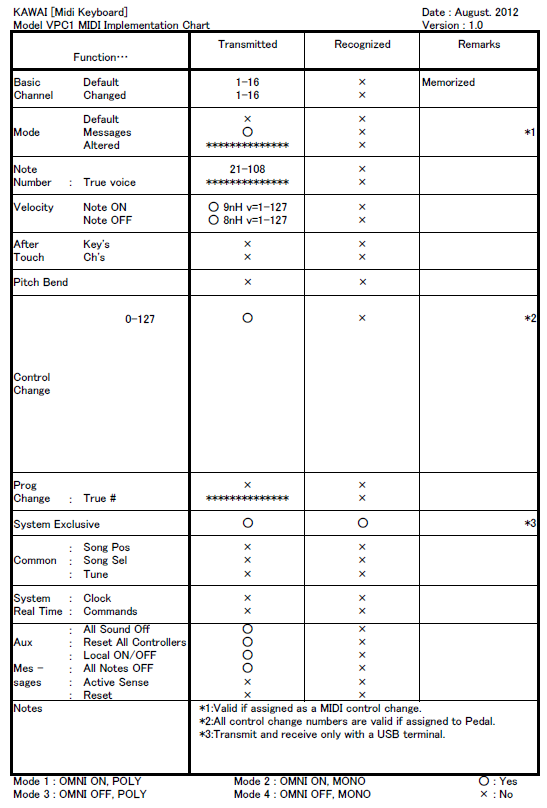
As an example, I am posting another MIDI Implementation Chart from another instrument (Kawai VPC).

For example, here I see that the Velocity Note Off is different from mine: 8nH v=1-127 while mine is V=0 (and 9n instead of 8n).

Is this parameter important for the sound rendering of the VST?

Attachment

Member

Reply 5 by Fabiuz

Posts
10
City
tivoli

Velocity is the measure by which (sorry) the note intensity is measured; obviously, it will also change the timbre a bit.

That said, try to copy someone else's parameters; today I'll check mine and see if I can help you better

Administrator

Reply 7 by Thesimon

Posts
4,504
City
Ariccia, RM

I'll tell you in very, very simple words...

Note number 21-108 simply refers to which MIDI input the VST notes should start playing from. If you do 21-108(+1), because starting to count from 21 up to 108 inclusive, you must add 1 to the subtraction, you get exactly 88, which are the piano keys. In short, it starts making the VST play from data 21 onwards up to 108. Data from 1 to 20 are keys that do not exist on a piano; they only exist on VSTs for special functions (for example, groups of notes and pre-sampled chords).

Note On: When you press a key, it accepts velocity values from 0 - 127 (received) and transmits up to 127 (transmitted).

Note Off: When you release a key that you have pressed, starting from velocity values from 0 to 127 (received), it transmits 0 (transmitted) because it must stop the sound.

Damper Pedal and Soft Pedal are the MIDI addresses that operate the damper pedal and the "una corda" pedal.

The settings seem correct to me; I don't think the problem lies here.

I would try something. I would get into Logic, Protools, Reason, Nuendo, Cubase, or any other similar software and record a short MIDI region playing as hard as possible on the piano keys. Then I would do another one playing them as softly as possible. At this point, it is possible to read the velocities. Playing with maximum force, the velocity should be 127... It's not hard to achieve that. Playing pianissimo, however, it is usually difficult to reach velocity 1, but even if you reached a velocity of 5/7/10, it would mean that the silent system is calibrated as it should be. If instead, playing loudly, you get a velocity lower than 120, then something is wrong and I advise you to call back the technician who installed the silent system to calibrate the sensors (if they can be calibrated) or to replace something that is not working correctly. It could also be something else, so to be sure, I always wait for the audio files.

Member

Reply 8 by dalrmi

Posts
13
City
Dalmine

Here I am, I am attaching the audio file esempio.mp3; you will find 3 notes played (middle C) where:

the first C was pressed pianissimo
the second C was pressed forte
the third C is produced by the VST virtual keyboard (pianoteq), unfortunately there is no way to play piano or forte with the mouse

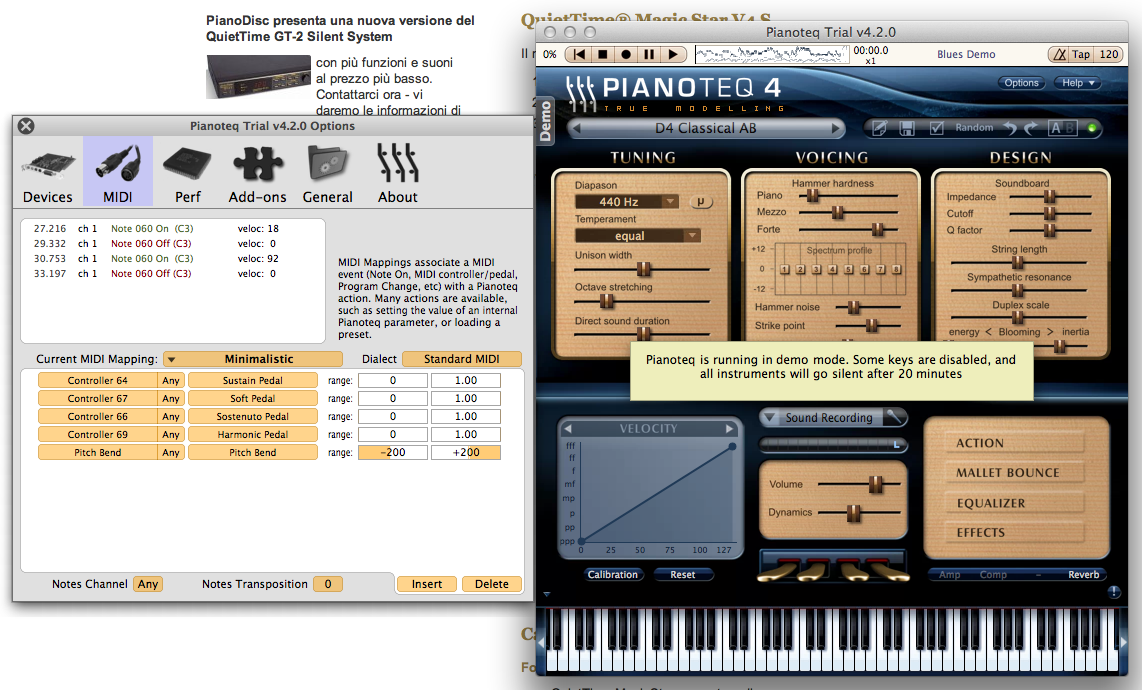
In the file impostazioni.png, I have displayed the settings of the VST (pianoteq) that produced the sounds present in the file esempio.mp3; I also entered (in the window on the left) the velocity values assigned to the first two notes of the middle C, as can be seen: to the first note played pianissimo, the value 18 was assigned, while to the second note played forte, the value 92; by experimenting a bit, I also managed to obtain some lower values (with extreme difficulty), about 9-10; conversely, on the forte, I never managed to go beyond 100-105.

I specify that the midi-usb cable is connected to the iMac with a USB extension (about half a meter) because otherwise I cannot reach it from the piano; I don't think this affects anything.

What could it depend on? Perhaps the VST needs to be adjusted better? There are so many parameters.... help!!!!

Thanks Maestro Simone and to everyone else who will/can answer me.

Ciao, Roberto.

Esempio.mp3
Attachment

Administrator

Reply 9 by Thesimon

Posts
4,504
City
Ariccia, RM

First of all, let's go with "Simone" instead of "Maestro Simone"; even though I finished my studies at the conservatory, "Simone" sounds less like a show-off.

The USB cable doesn't have anything to do with it. Data arrives via USB; this data either arrives or it doesn't. It can't arrive weak—we aren't in an analog field where if you extend an extension cord by a kilometer, you see nothing anymore because the internal resistance of the wire messes up the whole signal. In the digital field, something either arrives or it doesn't...

At this point, I would try to do what I told you: use a DAW to record a software instrument track and read the velocity of the notes played at fortissimo.

There is only one thing that seems strange to me, namely: if you use the silent system with headphones and without MIDI, doesn't it give you the same problem?

The point is that when you put on headphones, an internal sound card replaces the incoming MIDI sample with a sampled sound, exactly what a VST does when you connect via MIDI, with the difference that by recording via MIDI cable, you can do whatever you want in post-production, even make it sound like a sitar. In the case of plugging in headphones, the most you can do is attach an amplification system to go big in public with the volume cranked up by connecting to a 10,000-watt amplifier and speakers, or route the output to the input of a recorder. In short, you lose everything. But if while playing loudly in headphones you hear a sound corresponding to your forte, then something must be wrong.

How to solve it?

The ultimate test is to record a virtual instrument track and read the velocities; then there are two cases.

1) The maximum effort in playing corresponds to 127 -> In this case, then it's a VST problem, although it seems to me that everything is fine in Pianoteq.

2) The maximum effort corresponds to a figure lower than 127 -> In this case, you need to call back the person who installed your silent system and give them an earful while explaining the problem.

I realize, however, that it's difficult to make yourself understood and put certain advice into practice from a distance. Anyway, if you have any doubts, you can find me here or on my cell phone. But you must send me a message first because I often cannot answer the phone, and I will let you know a time to call me.

Do this test!

Member

Reply 10 by dalrmi

Posts
13
City
Dalmine

Perfect Simone (but you are always a Maestro even having finished conservatory!), so I have done more tests and now it seems improved to me, I manage to reach 127 as velocity playing hard on the piano (wow, what a play on words!).

Anyway, I saw that by playing with the VST parameters (in my case Pianoteq in demo version) the result changes quite a lot!

On my silent [system] there is the possibility to calibrate the keys (all together pressed one after another or individually with a single key) to adjust the sensitivity which goes from 000 to 255; for example, I took middle C and saw that it had the sensitivity set (from the tuner) at 116, I deliberately raised it to 150 but I haven't yet understood if this ultimately results in an increase in velocity in the VST; in the manual, sensitivity is associated with output volume, therefore it should be that low sensitivity = low volume while high sensitivity = high volume, but does this also ultimately correspond to the velocity parameter produced in the MIDI world? Who knows!

I mean, does the optical sensor of the silent system feel this sensitivity? I believe so! but I still need to understand it deeply.

In any case, I am happy; this means that my silent system (and therefore the optical sensors) works well. Now I just have to decide whether to purchase Pianoteq or Synthogy. By the way Simone, since you are very experienced with VSTs, I saw that Synthogy offers four products: Grand Pianos, Italian Grand, Upright Pianos and American Concert D; taking into consideration that I would always use it in my studio (a normal room of about 10sqm) and mainly with headphones (I managed to route the audio output from the Mac to the line in input of the silent system) connected to the silent system (maybe in the future, if it's worth it, I will equip myself with some good speakers for the piano), what product would you recommend? I saw that the prices are (+ or -) all around €200

In the meantime, thank you for the answers and for your availability to help me.

Roberto.

Administrator

Reply 11 by Thesimon

Posts
4,504
City
Ariccia, RM
dalrmi wrote:

Perfect Simone (but Maestro you are always, having finished the conservatory! )

Yes, but it feels old to me and like someone my age trying to act superior (I turned 30 practically 3 months ago!), like when they call me Doctor or Engineer; I don't feel comfortable, I don't like it, especially in a place like this where people speak to one another in such a friendly and direct way. It is an appellative that I try to use as little as possible because just mentioning it creates a sense of distance from people, whereas I consider myself very expansive, extroverted, and companionable; I only use it in concert programs and official documents, i.e., where I cannot avoid it, otherwise... Let's stick with "Simone"; I didn't have to pay for it, I didn't have to study to obtain it, and I like it because my mom and dad gave it to me as a gift.

then I did other tests and now it seems improved to me, I manage to reach 127 as velocity when playing loudly on the piano (hurray, what a pun!).

Anyway, I saw that by playing with the VST parameters (in my case Pianoteq in demo version) the result changes quite a lot!

On my silent [system] there is the possibility to calibrate the keys (all together pressed one after another or individually on specific keys) to regulate the sensitivity which goes from 000 to 255; for example, I took middle C and saw that it had the sensitivity set (by the tuner) at 116, I deliberately brought it to 150 but I haven't yet understood if this ultimately results in an increase of velocity in the VST; in the manual, sensitivity is associated with output volume, therefore it should be that low sensitivity = low volume while high sensitivity = high volume, but does this also ultimately correspond to the velocity parameter produced in the MIDI world? Huh!

I mean, does the optical sensor of the silent system feel this sensitivity? I believe so! but I still need to understand it deeply.

The game is all there. VST parameters are usually not touched. The velocity curve must be a straight line that starts at 0 and goes straight, without making curves, to 127. This means that the dynamic response of the VST is homogeneous. It practically means that an increase in force corresponds to a homogeneous and proportional increase in dynamics. I emphasize "proportional" precisely because as much as the force increases, so does the dynamic increase. Modifying the velocity curve means that a certain increase in force corresponds to a disproportionate increase in dynamics, both positively and negatively. I'll give an example: If I modify the velocity curve by making it concave, I press a key with a certain force (beyond the halfway point of the graph) -> I get a certain dynamic; I press the same key with a little more force and I get a much higher increase in dynamics. The fact that it is disproportionate also depends precisely on the graph.

Let's analyze it at least to clear things up, because I don't know how understandable this explanation I gave above was...

So here we have three velocity curves. Y-axis is the force we exert on the key, X-axis is velocity. By intersecting with the graph, we obtain the sound level coming out of the speakers every time we press a key with a certain force. In all three graphs, there are green and purple lines. Being able to move the velocity above or below the linear trend line, to find the center point of the graph—that is, the average value of velocity and exerted force—I must trace the reciprocal line which must form a right angle with the linear trend graph (if the graph was made well). In the other modified graphs, this line instead shows us the "exchange" value, and you will see that I will clarify the concept well in a moment.

As I said at the beginning. Playing with a linear velocity curve, an increase in exerted force corresponds to the same increase in velocity (being linear). Let's see what happens in the case of the concave curve...

Exerting forces within the range of the Y-axis before the exchange point, we see that we obtain a very low change in velocity; this means that even when playing with the intention of obtaining a forte, we will actually get a piano. After the exchange point, increasing the force even slightly will result in progressively much higher velocities. The sound will all grow together at the end.

The last graph, the convex one, is the exact opposite of what we have just analyzed...

Exerting quite weak force on the keys, we see that the velocity value is very high; this means it will be very, very difficult to play pianissimo, while it will be very easy to play forte. Once we reach the exchange point, all the force exerted from that point onwards will cause the dynamics to increase only slightly, and therefore unlike when we exert little force and with little difference we obtain"

very different dynamics before the crossover point; in this case, (that is, after the crossover point) you won't notice much difference in dynamics even when applying increasing pressure each time. In short, this solution helps to play loud, but it proves very difficult to play pianissimo and manage weak dynamics. Everything ends up being crushed into forte.

As you will have understood, in neither case would it sound natural. What best conveys the pianist's sensations is linearity; to this force, this velocity corresponds linearly, and that's it.

Imagine playing a piano where you press hard and hear a very faint sound, then by applying just a little more force you pass the crossover point and suddenly you burst the eardrums of everyone in the room... "And yet I had only used a little more force..." Ehehehe, you can see for yourself that it is unmanageable and unnatural.

If you have the ability to manage velocities, then you are all set. Try this and close everything... Set a range from 000 to 050, so you can evaluate if even playing fortissimo results in a very dull sound. I believe that to take full advantage of VST velocity, you should set the minimum value to 000 and the maximum value equal to the full scale, which is 255. Being optical sensors, they probably have much more sensitivity, but since they must transmit MIDI data with a maximum velocity = 127, they must surely multiply by a correction factor (0.498). Example... I play at 150 and I have to convert it into MIDI velocity to be sent to the VST... 150*0.498=75 rounded up. Now the problem is that if you give it 150 as a maximum, it sounds like 75 to me as the maximum velocity! That's why you sound quiet. I believe my logical deduction is the only possible one. Try setting a range from 0 to 255 inclusive and you will see that you solve the problem.

Anyway, I am happy; this means that my silent system (and therefore the optical sensors) works well. Now I just have to decide whether to purchase Pianoteq or Synthogy. By the way, Simone, since you are very experienced with VSTs, I saw that Synthogy offers four products: Grand Pianos, Italian Grand, Upright Pianos, and American Concert D; taking into consideration that I would always use it in my studio (a normal room of about 10sqm) and mainly with headphones (I managed to route the output audio from the Mac to the line in input of the silent system) connected to the silent system (maybe in the future, if it's worth it, I will equip myself with some good speakers for the piano), what product would you recommend? I saw that the prices are (+ or -) all around €200

In the meantime, thanks for the answers and for your willingness to help me.

Roberto.

As Caesar said: "De gustibus non disputandum est" (In matters of taste, there can be no disputes). I can tell you mine, which is, neither... I would opt for East West but I realize it's quite expensive! To do things properly, including shipping etc. etc., it costs almost 700 euros and a very powerful Mac (at least 8 GB of RAM, i5 or better i7). Having to settle for the two you mentioned, then I would go blindly for Ivory II - Italian Grand, which also sounds very good.

Regarding the speakers... Look, putting the silent device on just to hear through speakers seems absurd to me; deactivate the silent mode and play normally on the acoustic piano... Unless you want to record in MIDI, then that's a different story.

Even for the speakers, you have to choose with knowledge. I would opt for two nice studio monitor speakers. But with 200 euros, you won't get anything. You need to reach at least 600 euros and you'll get two nice Genelec 8020A, which are not very powerful (bi-amplified 20w+20w)... And you must hear how the Genelecs sound, they are extremely clean! Otherwise, if you want to save something, for about 300 you can get two Yamaha HS50M 70 watts; they are more powerful than the Genelecs, they don't sound bad, but they don't even come close to the Genelecs.

It depends on you.

Obviously, for monitor speakers worthy of being called STUDIO MONITOR SPEAKERS, we are talking about different prices altogether. Just think that often a pair of excellent studio monitors costs almost more than all the rest of the equipment. There are monitors that cost even more than 20,000 euros. I've told you everything. Obviously, you don't have to produce Celine Dion records, so for you, the ones I wrote are more than fine. In 10sqm, power isn't needed, clarity is; I strongly recommend Genelec.

Ciauz

curvevelocity.jpg

Member

Reply 12 by dalrmi

Posts
13
City
Dalmine

Thanks Simone, you are too strong and competent! Compliments!

So I think I have understood almost everything regarding: "If you have the possibility to manage the velocities, then you are all set. Do a test and close everything... Set a range from 000 to 050, so you can evaluate if even when playing very loudly, a very dull sound comes out. I believe that to exploit the full velocity of VSTs, you should set the minimum value to 000 and the maximum value = the full scale, which is 255. Being optical sensors, they probably have much more sensitivity, but then having to transmit MIDI data with maximum velocity = 127, it must surely multiply by a correction factor (0.498). Example... I play 150 and I have to convert it into MIDI velocity to be transmitted to the VST... 150*0.498=75 rounded up. Now the problem is that if you give it 150 as a maximum, this sounds like 75 to me as maximum velocity! That's why you sound quiet. I believe my logical deduction is the only possible one. Try setting a range from 0 to 255 inclusive and you will see that you will solve the problem."

I don't understand when you write "Set a range from 000 to 050" and then at the end "Try setting a range from 0 to 255 inclusive"; if you are referring to the sensitivity settings of the Silent system, I can only set one value for each key pressed, a value that can oscillate from 0 to 255 inclusive.

Regarding the Velocity curve, I have understood everything well; it only leaves me perplexed by the fact that in PianoTeq there is a calibration button specifically for the Velocity curve that makes you play piano first, then normal, and then very loudly in order to create a Velocity curve that best adapts to your system; I tried it and the resulting curve is not linear at all.

Regarding speakers: I agree with you on the fact that it's not very useful to play with the silent system and then make the sound heard (better the acoustic one then!), in effect I expressed myself poorly, I think it is much more useful to get a good pair of headphones to better enhance the VST sound, what do you recommend? I have read around and the best for this type of use are open-back ones from Sennheiser (I hope I wrote that correctly!).

The speakers could come at another time.

The whole thing stems from the fact that if I decide to use a VST, it is only to hear a sound (much) better than the built-in one of the Silent system; otherwise, I'll stick with that and that's the end of it. If I have to invest, I do it to improve and not the other way around.

Many thanks, Roberto.

ps. I agree with you on the title Dr. or Eng. !!! ...colleague! Simplicity above all!"

Administrator

Reply 13 by Thesimon

Posts
4,504
City
Ariccia, RM
dalrmi wrote:

Thanks Simone, you are too strong and competent! Compliments!

If only!! We will talk about it again this summer when, God willing, I will finish my studies in Sound Engineering...

I don't understand when you write "Set a range from 000 to 050" and then at the end "Try setting a range from 0 to 255 inclusive", if you are referring to the sensitivity settings of the Silent system, I can set only one value for each key pressed, a value that can oscillate from 0 to 255 inclusive.

Exactly, you can also proceed immediately by setting the sensitivity to 255; at least you will make use of the entire velocity range.

Regarding the Velocity curve, I have understood everything well, it only leaves me perplexed by the fact that in PianoTeq there is a calibration button specifically for the Velocity curve that makes you play piano first, then normal, and then fortissimo, in order to create a Velocity curve that best adapts to your system; I tried it and the resulting curve is not linear at all.

And I believe you. Through one point passes a beam of lines, through two points passes one and only one line, through three passes one and only one curve—in the only special case, for three aligned points, one and only one line (if the middle value is linear with the first and third, a line might also emerge, but it is infinitely more likely that a curve emerges).

Speaker talk: I agree with you on the fact that it's not very useful to play with the silent and then make the sound heard (better the acoustic one then!), in effect I expressed myself poorly, I think it is much more useful to get a good pair of headphones to better enhance the sound of the VST, what do you recommend? I have read around and the best ones for this type of use are open-back ones from Sennheiser (I hope I wrote that correctly!).

Speakers could come at another time.

The whole thing stems from the fact that if I decide to use a VST, it is only to hear a sound (much) better than the built-in one of the Silent system; otherwise, I'll stick with that and that's the end of it. If I have to invest, I do it to improve, not the other way around.

Thank you very much, Roberto.

ps. I agree with you regarding the title Dr. or Eng. !!! ...colleague! Simplicity above all!

There are a ton of headphones. From 10 to 500 euros. A piece of advice... Stay in a range from 80 to 150 and get a good, even professional product. Open-back headphones, certainly; why would you need closed ones? Unless you are a DJ, you might hear some noise outside...

Brands: Sennheiser, AKG, KRK. If you go with AKG, it seems to me that from the 141 onwards they have replaceable earpads (they are subject to deterioration and if the headphones are still good, why throw them away because of the earpads? You just change those and you get another year out of them!).

You could also use the VST for MIDI recording purposes.

Let me explain better.

There are two paths, and let's assume that the sound of your silent is better than any library on the market.

Be careful when using the term VST. VST (Virtual Studio Technology) refers to a musical plugin. Musical plugins are divided into two types: effects and software instruments. Effects are all the digital effects used as virtual inserts in DAWs: reverb, virtual guitar amplifier, compressor, equalizer, dynamics processors, etc. Software instruments are plugins that accept MIDI data as input and return an audio signal. A VST, therefore, can be Kontakt or Play by East West, etc. These plugins thus accept input data for MIDI input but cannot return anything in output until a sound library is loaded—the same sounds that the VST will substitute for the corresponding MIDI data.

This was just a formality that I thought was worth clarifying to you.

Returning to the silent discussion. Let's say your piano has both a MIDI out and a MIDI in port. If you prefer the sound of your silent, you can record in MIDI on a DAW using the piano's MIDI out, make the appropriate MIDI corrections in the DAW (wrong notes, etc.), and then use the same DAW as a sequencer to transmit the MIDI instructions to your silent, this time via the piano's MIDI in port. Practically, the piano will use its plugin to play. You can take the signal from the audio output and record it on another device as an audio track, certain that there will be no errors.

The second case is that you don't like the sound of your silent and prefer to go with a library, or your piano does not have a MIDI in port.

Well, in this case, you get a library and do everything on the DAW, end of transmission.

Honestly, I have never heard the sound of a silent. I remember playing once on a piano that had the silent system but as an acoustic, not as a silent, I remember

the keyboard is quite good but I cannot say how the samples in silent mode were.

Member

Reply 14 by dalrmi

Posts
13
City
Dalmine

Thank you very much Simone for all the exhaustive answers, I will do some tests with the key sensitivity of my silent system.

Ciao, Roberto.

ps. good luck for this summer! Let us know...

Log in to participate