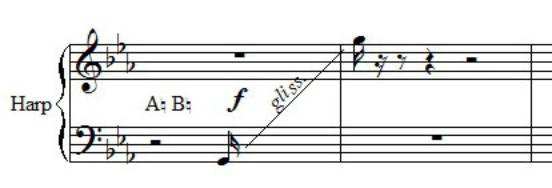
I am having a problem correctly writing a harp glissando in Finale 2014. To write it correctly, I should put a short note, for example a quarter note, then the glissando line and the other note. The problem is that since the glissando takes up the entire measure, if I put a quarter note at its beginning, the software automatically fills the rest of the measure with rests, which is not what I want in this case. How can I overcome this problem?
I am attaching an image to show what I would like to achieve.
For graphics, it would be enough to hide the excess rests by selecting them and using the "h" key on the keyboard. Once this is done, it's enough to change the notehead (white or black, whichever is preferred) or even hide the stem to indicate only the pitch.
If playback were also needed, playing with these ingredients, one can fill the entire measure with notes and then "hide" what is not necessary.
It is only for the graphics, because it is a score that I have to present for a competition, so I would like it to be as graphically correct as possible. Thanks for the answers.
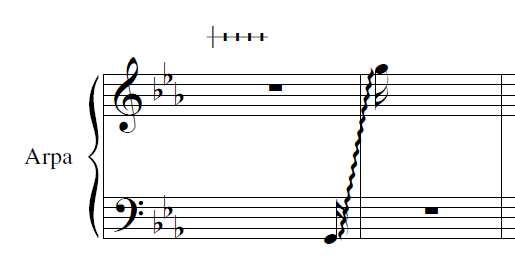
I wrote the pedals, there is a library in Finale for harp pedaling that needs to be loaded; it starts with two perpendicular lines and then other vertical lines are manually added corresponding to the notes re do si, to the left of the existing vertical line, and it makes me sol la, to the right of it. My problem was the glissando; I haven't had a chance to try hiding the rests yet, I will let you know....
B
Bit
Member
Reply 8 by Bit
Posts
225
For the harp pedals, you can also do everything with a final [setting], via the expression menu.