Does anyone know if there is a way in Finale to automatically order the orientation of notes between different layers to avoid crossings and collisions (possibly also with third-party plugins)? In the document options, one can establish, for example, to orient layer 1 at the top and layer 2 at the bottom, but doing so they obviously "cross" constantly and therefore everything has to be redone "by hand" every time. Even the positioning of slurs is not automated regarding this need. Does anyone have any advice?
In the meantime, you can select the treble clef icon; at the beginning of each staff, 3 white squares are activated. The one furthest to the right, close to the clef, is used to move the staves up and down. If you take the one on the first staff... you move everything; if you take the following staves, you only space that one and those below it... it's faster to just try.
If you do the same by first selecting the entire staff (mouse click to the left of the staff, I mean the white part), when you space the chords... you will do it for all pages and not just on the current one.
I don't know if I answered... because I didn't understand the question 100%
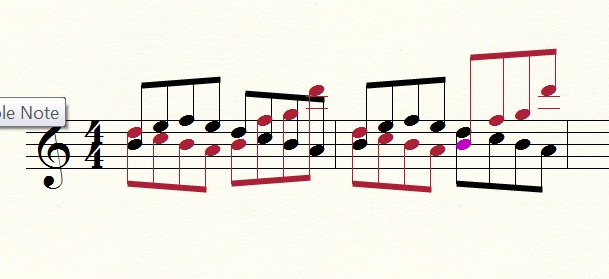
My problem isn't the stem directions. I'll post an image so I can explain better. The notes are random.
In black is layer 1 which is set upwards, in red is layer 2 which is set downwards. Now, the first half of the measure makes sense as written, but the second half would be more readable with the layers flipped, and to do this I have to do it manually (select the note and press key L), as in the second measure. I was wondering if there is a method to automate the procedure.
So, if you care about such intertwined writing on a single staff [I think the fragment is intended for 2 instruments or 2 different hands, so 2 staves might be a solution...given the unplayability of a couple of points at a pianistic level with one hand alone (although it's true that if they were clarinet 2,3...it would be a real case).]
Ignoring my useless premise, if we were in a pianistic context, one hand, I find the writing unpianistic; the solution lies precisely in the writing technique which must be adapted to the instrumental gesture. If it were instead for 2 clarinets or similar cases...then all you can do is play with the distance of the noteheads using the menu: Instruments, advanced instruments, special instruments, note position.
If you select 1, you work on the black notes and if you select 2 you work on the red notes...the fact that everything worked correctly can be deduced from the white squares that activate above the notes when selecting the relevant measures.
I thank you DiesIrae. As I was saying, the example was random, just to explain myself. As you say, there are "manual" methods to manipulate the score, but what interested me was understanding if an automatic method existed. Personally, I would find it useful. Especially if you happen to deal with MIDI acquisitions or improvisations, but even in general, it would be good support.
What you have proposed is the result of automation
... then you can modify things by hand. Let's say it will be an example, but in the repertoire there aren't many similar examples ... eventually we can try to analyze one together and then try to reproduce it
halfway automation, the first measure is automatic, for the second I had to press the L key
naturally the crossing of parts is not frequent... but it's not just chorales
Aside from the measures, if a midi file has multiple separate tracks and if when you open it you want to combine the tracks, it is easy to run into situations like that...
That is exactly the point, if you give up the logic of voices, and therefore a contrapuntal discourse... black legs up, red ones down, green ones up, blue ones down...
Practically, you are interested in the piano case of a single hand doing everything, so you give the high part to the black and the low part to the red ....there is no program that can distribute the voices between the hands... they haven't reached that yet and perhaps they never will...
In the end, he makes a very elementary reasoning: black up and red down... even the first eighth note of your example is theoretically tangled... from my point of view, you should do everything with layer one... playability aside. Otherwise, you are musically dividing the parts between 2 instruments ... it's not that Finale can also orchestrate. If you choose to give voice 1 to black and voice 2 to red... he respects your idea of polyphony... if it is not polyphony, the 2 layers are useless.
Then, if you encounter the problem during the MIDI conversion phase... then it's another story, but it no longer concerns the layers but the reasoning on how that specific MIDI is constructed (single track or multi-track) in relation to the number of staves toward which you want to perform the conversion.
Therefore
> half-automation, the first measure is automatic
No ... entirely, I see all the black legs up and the red ones down...
The final algorithm has it and it is correct; if one chooses 2 layers, they are writing within the contrapuntal scope. By convention, the direction of the stems describes whether a note belongs to one voice or another, and for me, the musical content of measure 1 is quite different from measure 2... even if the notes are the same.
The difference will be made by the paper once the score is printed; what I mean is that once the colors disappear, the stems will remain, and from my point of view, the sense of the 2 measures is quite different... in the second, the repetition of re do si la will stand out, which in the case of counterpoint eliminates a potential imitation between the 2 voices or otherwise shows a repetition procedure... which must make sense within the musical discourse (the before and the after).
Therefore, the notation is at the service of the music and of a musical sense. To be clear: no polyphony... no 2 layers... otherwise "L" is the solution designated for these needs.
Anyway, you can program down to the bit with LilyPond, a very powerful language that allows you to do everything in a graphic sense... that's where you have to explain even the obvious to the program... I have also had the chance to try something...
In my opinion, the meaning of everything would be understood without the extreme case proposed by Bianca... it would bother me a lot if, based on some final rule of hers (Computer Science?), it did not respect spelling conventions ...who knows what would come up with Bach's fugues
The final algorithm has it and it is correct; if one chooses 2 layers, they are writing within the contrapuntal scope. By convention, the direction of the stems describes whether a note belongs to one voice or another, and for me, the musical content of measure 1 is quite different from measure 2... even if the notes are the same.
The difference will be made by the paper once the score is printed; what I mean is that once the colors disappear, the stems will remain, and from my point of view, the sense of the 2 measures is quite different... in the second one, the repetition of re do si la will stand out, which in the case of counterpoint eliminates a potential imitation between the 2 voices or otherwise shows a repetition procedure... which must make sense within the musical discourse (the before and the after).
Therefore, the notation is at the service of the music and of a musical sense. To be clear: no polyphony... no 2 layers... otherwise "L" is the solution designated for these needs.
Anyway, you can program down to the bit with LilyPond, a very powerful language that allows you to do everything in a graphic sense... that's where you have to explain even the obvious to the program... I have also had the chance to try something...
Either I am missing something or I cannot explain myself. The two measures are identical in terms of notes. The notes of the first measure of layer 1 are exactly the same as the notes of the second measure, and the notes of the first measure of layer 2 are exactly the same as the notes of the second measure. I did a copy-paste. Then in the second one, I reversed the stems. Here I am not necessarily talking about counterpoint. Two distinct layers can serve, besides for example giving different durations to parallel notes, to also be able to give a different dynamic to the two voices.
Either I am missing something or I cannot explain myself. The two measures are identical in terms of notes. The notes of the first measure of layer 1 are exactly the same as the notes of the second measure, and the notes of the first measure of layer 2 are exactly the same as the notes of the second measure. I did a copy-paste. Then in the second one, I reversed the stems. Here I am not necessarily talking about counterpoint. Two distinct layers can serve, besides for example giving a different duration to parallel notes, to also allow for a different dynamic between the two voices.
But indeed, if there is no difference... if you want to use 2 layers, write the correct notes for each of them from the start ...to be clear, the red bass part and the black treble part...
In my opinion, the meaning of everything would be understood without the extreme case proposed by Bianca... it would bother me a lot if, based on some final (IT?) rule of hers, it did not respect spelling conventions ...who knows what would come out with Bach's fugues
indeed. I wrote those notes randomly and perhaps it caused confusion. With 'Finale' you can set the convention: for example voice 1 stems all up, voice 2 stems all down, but when the voices cross, it can become a mess. Now, if I am told that parts should not be crossed, then that is a different story. But then what happens when, in addition to the first two layers, you also use the third and fourth: they will inevitably overlap and you will have to modify them each time as appropriate."
It's not that they shouldn't overlap; if you do, it requires reasoning, and a program's default only satisfies one part of musicians... for better or worse. I'm not saying it can't be done, it's just that behind it lies a choice in service of a sense... which cannot choose a single solution for everyone in one program. Therefore, his reasoning is somewhat as described ...