I am a "70s guy". I used to play in a band and those were the times when everything was analog (Farfisa keyboard and a three-octave Davoli monophonic Moog!!!). After a long time, I started playing again with other friends but, although I always have a computer in hand for work, I unfortunately missed the years when MIDI protocols and everything else arrived.
I recently purchased a Nectar Impact LX61+ master key and a Yamaha Reface YC. I have connected them via USB to my Mac (Logic Pro X). For days I have been trying to assign the two instruments to different tracks, but I can't succeed; each one plays the same instrument. Logic has a lot of functions and I am honestly getting lost. Can anyone give me a hand?
hi gianni, do you have an external audio interface? if so, connect them to different inputs and each to a different stereo output.. if you want to use them as midi and control vst instruments you must use separate midi channels 1,2...up to 16.
you must use logic to assign the input and the output..
I don't have an external sound card, I use the one from the Mac... in short, the two USB cables go into the Mac and I connect the analog output to the mixer.
hi gianni, i no longer have the mac so i don't remember if you can configure keyboards in system preferences. if it can be done, you should already see them in system preferences but the sounds are not in the computer but in the keyboard, therefore the output of the keyboards must go to the input of your mac's sound card and then you can record them as individual audio tracks or together. just to be clear, you have to send what comes out of the keyboards to the mixer input to have signal monitoring and the mixer output must be sent to the mac input to have the audio to record. by connecting them via usb, if i understand correctly, they only function as midi.
I solved a problem like this for a guy who had contacted me on the internet via a remote desktop session. Honestly, I don't remember what the problem was at this moment. I will try to remember if something comes to mind and I will write back to you.
Ok, so the problem is clear... Two MIDI to USB interfaces are sending the signal on the same channel, which is why the keyboards are playing the same thing. You have 2 alternatives...
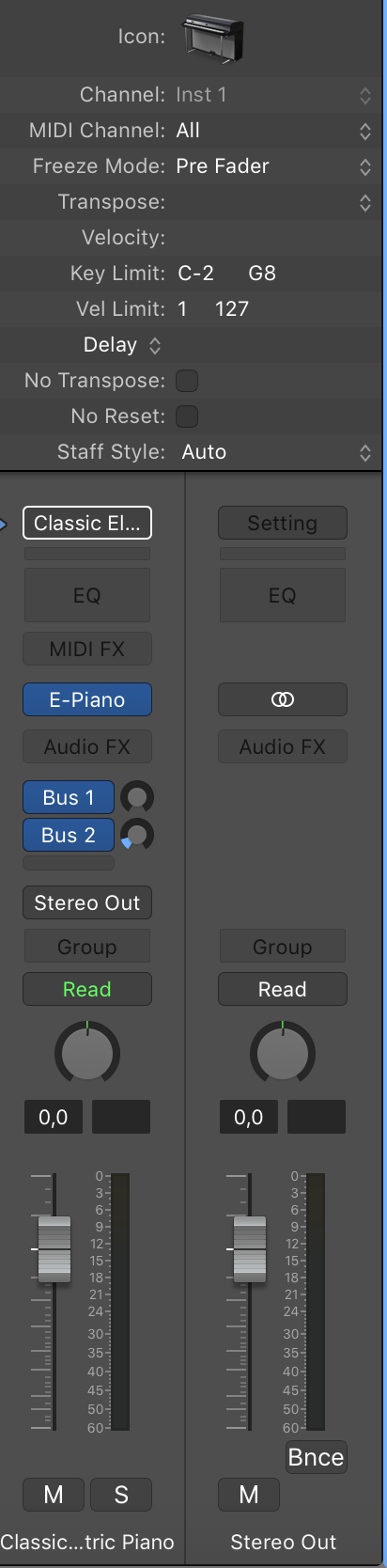
At the top of the channel strip, you can set a MIDI port number which Logic sets to "All" by default; meaning it takes in any MIDI channel on which MIDI data is generated as output from the keyboard (you can see this in the figure).
Once set to 1 for the first keyboard, it should play correctly, but it is very likely that if you set the channel strip of the second keyboard to 2, it won't work. This happens because the MIDI out channel must also be set on the keyboard itself, so you need to try and find the settings to set the midi channel in your keyboard's manual.
You will end up with MIDI channel 1 for the first keyboard and MIDI channel 2 for the second keyboard, which correspond to MIDI channels 1 and 2 respectively set on the Logic channel strip.
This way it should work.
There is a second way if by any chance your keyboard does not offer the possibility of setting the MIDI out channel... Creating a Layered instrument, i.e., an instrument composed of two instruments; there are several tutorials online. I recommend, also because it is a cleaner method, opting for the first solution I gave you if your keyboards allow it.
I had already tried the first solution (I went that way by "technical" intuition, I've been in the electroacoustic/electronic sector for years) but without results, although they appeared on different midi channels (1 and 2).