

As per the subject, thanks in advance
Member
Opening post by Oracolo
- Posts
- 317
Started by
Oracolo
Member
Member
As per the subject, thanks in advance

Member
There is only one solution for polymetry, single measure and subdivisions via the expression menu
Member
Thank you, you are a genius!
Member
DiesIrae wrote:There is only one solution for polymetry, single beat and subdivisions via the expression menu
Can you be clearer?
Member
Example:
2/4 over 3/4
So:
- create a measure of 6 quarter notes (appropriately hiding the time signature)
- insert the notes, forgetting about the divisions given by the measures
- from the expression menu, insert the measures where you need them: every 2/4 in the first line and every 3/4 in the second
Graphics and playback are preserved, but the important thing is to be careful with the printing of the parts; verify the correct position of the bar lines inserted via the expression menu
Member
Great Diesirae, but then how do I add the meter indications (2/4 and 3/4 time signature changes)?

Member
do you mean this?
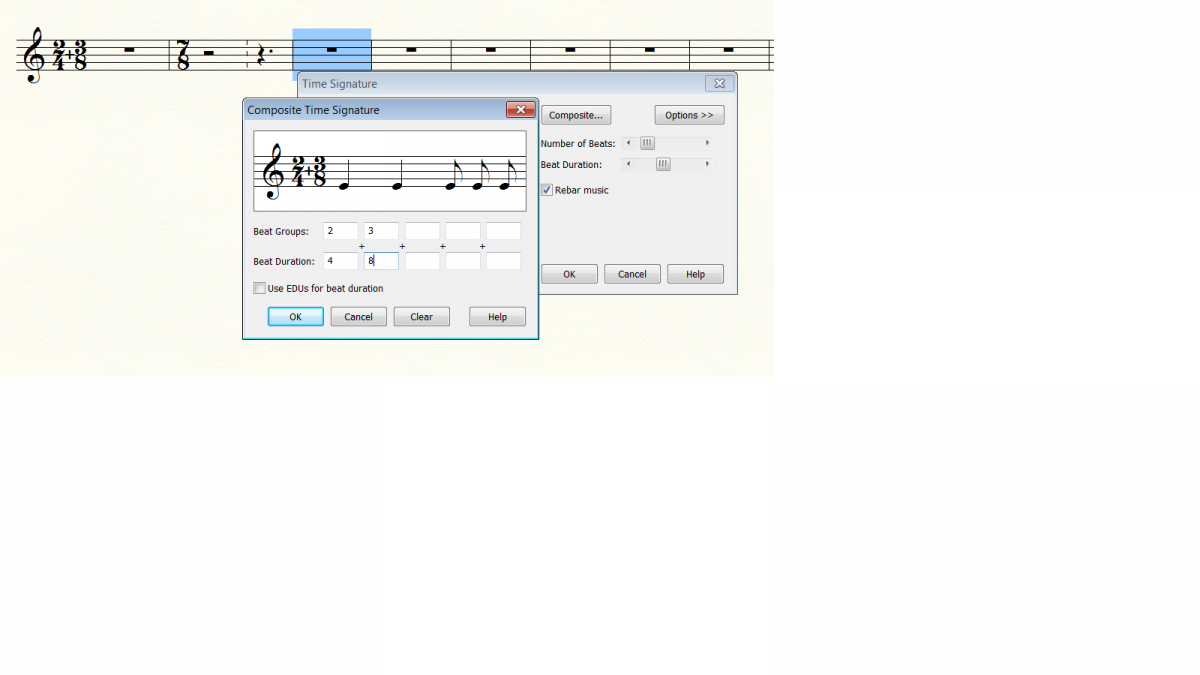

Moderator
Oracolo wrote:Great Diesirae, but then how do I add the meter indications (2/4 and 3/4 per measure)?
Always expression menu, you must create the numbers for denominator and numerator and place them strategically (working at 200% zoom is highly recommended).
Moderator
DiesIrae wrote:- you create a 6/4 bar (appropriately hiding the time signature)
I don't know if this also answers Bianca; to do it, just go to "more options" and select: Show a time signature different from the one set, and then ok.
Member
Frank wrote:I don't know if it also applies to Bianca, to do so just go to "more options" and select: Show a time signature different from the one set, and then ok.
exactly, you can create compound meters as you wish and then you can use the "Measures" menu
Moderator
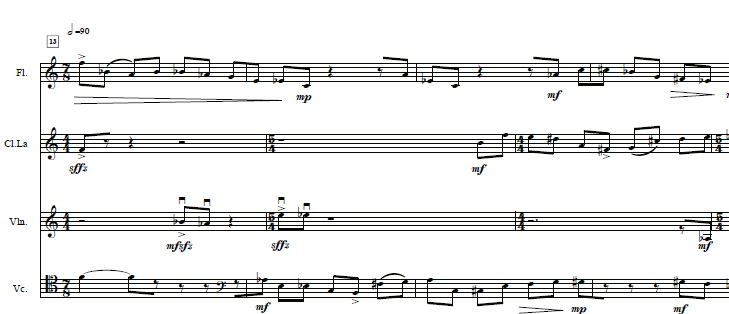
From my point of view Bianca, by a somewhat “strong” polymetry one means something like in the attached example.
How would you realize it?
Member
Frank wrote:From my point of view Bianca, by a somewhat "strong" polymetry one means something like in the attached example.
How would you realize it?
mah? Line by line it can be done, but as a group I believe that with Finale it cannot be done, or maybe you can do it at the notation level, but not as playback (at least I remember trying and not succeeding).
If Oracolo means something like this, then I don't know if Finale is the solution.
Member
Bianca wrote:mah? line by line it can be done, but as a group I think that with Finale it might not be possible, or maybe you can do it at the notation level, but not as playback (at least I remember trying and not succeeding).
If Oracle means something like this, then I don't know if Finale is the solution.
actually no, wait...
Member
no, I confirm the above
Moderator
Sorry Bianca but I did it. It's a fragment of one of my pieces that is also played in playback
The procedure is the one correctly described by DiesIrae
Member
Thanks everyone, as usual split hairs.
@Bianca
Yes, I meant something like the example posted by Frank
Member
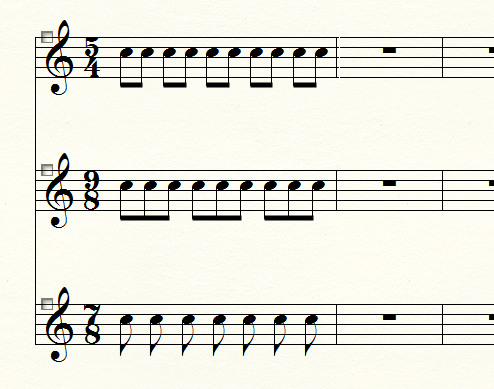
I can do this (see attachment), but, as I was saying, unless I use the Expressions menu—which is exactly what I wouldn't want to do because I don't know what effect it will have on the actual playback rhythm—I cannot move the barline (that is, using only the tempo menu).
Moderator
So Bianca, what is the metric structure of your piece? Clearly 7/8 will meet 9/8 at a certain point. I am sure I don't need to explain any mathematics to you, but 9x7=63.
Therefore, above you will have 9 bars of 7/8 and below 7 bars of 9/8, all in a single bar of 63/8.
You will manage the playback with an eighth-note unit; if you want light accents (to highlight the characteristics of the 2 meters), insert "_" in hidden mode and the rest, alternating 7/7, 9/8 and measures... with the expression menu.
With a little work, you'll save your skin.
Consider that in this piece of mine, 5/4 and 4/4 alternate on 2 staves, and on the other 2, 7/8, so you just have to be resourceful and everything is possible. Always with a lot of effort...
Member
sure, as I was saying, by using the expression menu (and obviously accenting as you suggest) it can be done. Just for completeness, if anyone is interested, those measures in the previous image can only be done with the tempo menu: just tell the end that each staff can have different metric indications (and this is done from the staff options) and in this way you will actually have staves with different metrics.
One inconvenient thing, when using the same meter for all staves, hiding it and adding the rest by hand, is that for example if you want to indicate a ternary time on one staff and a binary time on another (for example a 6/8 = 3+3 and a 6/8 = 2+2+2), the eighth-note groupings cannot be done automatically (obviously you can still place the accents by hand). On the other hand, a normalized representation like the previous example is not intuitive and at first glance even seems wrong. And what I cannot do is precisely remove this normalization while maintaining distinct rhythms (even if musically I don't even know if it makes sense).
Moderator
I didn't understand what you can't do Bianca, maybe a scan of the classic piece of paper could help