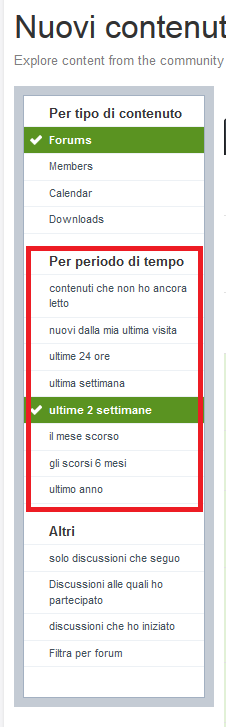
When I log in, if I click on 'view new content' for the first time, I get a list of all the conversations that I haven't read yet. When I view a discussion and click on 'view new content' again, many fewer discussions appear in the list of those I haven't read yet. Is this a problem only I am having?
Which browser do you use and what kind of settings does it have regarding cookie management?
Keep in mind that on the left, you also have the possibility to choose how many days or weeks you can go back.
I hope this was useful
S
stefano
Member
Reply 3 by stefano
Posts
205
I tried using Internet Explorer and Google Chrome and cookies are enabled on both. I always have the same problem.
If I use the other items it seems to work, but it also shows me content that I have already read. I only have problems with the 'content you haven't read yet' item or something like that. I can't understand it.
Thanks for the help anyway. Has this happened to anyone else?
If I use the other options it seems to work, but it also shows me content that I have already read.
Of course, it shows them to you but with a different "color"; those still to be read are in bold.
In my opinion, it's just a matter of "choosing" the most convenient viewing mode; no one is forbidding you from changing the view as needed. If you only want recently active unread topics... use "Content I haven't read yet", otherwise you see recently active topics (not all of them), with color differentiation.
S
stefano
Member
Reply 8 by stefano
Posts
205
I encounter the problem specifically with the contents function, which I haven't read yet. Everything works fine with the others...
But in my opinion it's not a problem, if you only want the unread ones it's normal that if you access a discussion... then it disappears from the list. That is the preferred view for lurkers and it seems to me that you are not one
S
stefano
Member
Reply 10 by stefano
Posts
205
I apologize, perhaps I explained myself poorly...
Let's say that at the moment of my connection, if I view new content, I have 10 unread discussions. I click on one and I should still have 9 discussions to read. When I return to 'view new content', instead of having 9, I don't have any left at all...
I use last week, if the bold disappears ... I have already read. I am satisfied with this view.
I tried using Stefanus's one anyway; it practically works like last week but only on the active topics since my last visit. So it is just a matter of quantity: fewer but differentiated between bold (unread) and non-bold (read).
I hope I explained myself.
@Stefanus, problem aside, are you sure it's more convenient to make already read discussions disappear?... they change color differently anyway and you always have the latest active topics at hand, where there is discussion.