i transcribed a solo with Finale 2012, essentially about one A4 page long.....
if it weren't for just two bars that end up on a second page. is there a way to shrink the entire score so that it fits completely on a single page?
thanks
ScalaQuaranta
E
Exit
Member
Reply 2 by Exit
Posts
88
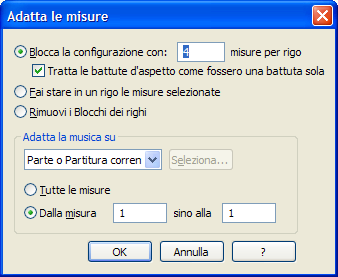
You can force the number of measures per line; the default is that Finale calculates it based on standard readability and spacing parameters ...but you can decide how many measures to fit per line, and to force them just select them, ctrl-m, type the number of measures, and then ok.
If the manual layout suggested by Exit does not satisfy you, without altering the line configuration, you can also play with the page enlargement/reduction percentages and the bracket spacing (including relative measurements) in such a way as to fit everything onto one page, albeit with smaller notation or closer brackets. It's up to you.
So:
Tools --> Page Setup --> Resize Page
Or
Tools --> Page Setup --> Resize Brackets
If you are just a little short, you can also play with the page size, modifying the margins or even writing for A3 and then printing on A4, taking advantage of the native features of the printer/PDF converters
In Page View, activate the Selection Tool and select a region of measures (or part of a measure). From the Utilities menu, choose Fit and measures.
For English, assuming it is the third menu item from the left, you have File, Modify, and then Utilities; you will find the entry there... eventually try them all until the window proposed by DiesIrae opens... if you look closely, the shortcut is also suggested