

As per the subject, I would like to learn how to use a good software. Which one do you recommend between Sibelius and Finale?

Administrator
Opening post by Thesimon
- Posts
- 4,506
- City
- Ariccia, RM
Started by
Administrator
Administrator
As per the subject, I would like to learn how to use a good software. Which one do you recommend between Sibelius and Finale?
Member
I have been using Finale for over 20 years now and I have always had Apple.
This program seems to run better on Mac since it is native, whereas the Windows version came later.
If desired, Finale can do everything from the score to playback, although it is not exactly that immediate.
Human Playback works up to a quartet; with larger ensembles, you need to integrate with MIDI Key Velocities.
I was thinking of integrating with Cubase for the playback.
I am not familiar with Sibelius.
Member
they are the top 2 .... since you have to start from scratch, you can easily roll the dice
maybe Sibelius is more intuitive for beginners, but if you want to do things properly, you'll end up going crazy anyway, so ....
i would choose based on who you know you can bother more; if you know someone very helpful who has Finale or Sibelius, choose based on that.
then obviously there is the forum .... what am I even saying

Member
I quote AleGozzo's post; at the end of the day, the important thing is to know someone who masters the instrument so you can pester them and ask questions (even "idiotic" ones at the beginning). There are a lot of people here who use Finale and Sibelius ... so ... it's just a matter of choosing ...
Maybe watch something from the Workshops to get an idea of the graphic implications. As far as playback is concerned, we have examples of Geppino using Finale and examples of CromaDiBrera using Sibelius... there is an embarrassment of riches.
Margari, download the trials and see which of the two inspires confidence instinctively... the rest will follow naturally.
Administrator
But I was actually thinking of studying a few manuals myself, then perhaps for any ambiguities, I would ask here on the forum. Usually, I devour them in a week, but the logic one took more time, quite a lot, but it was over 700 pages and only in English. Does anyone know of any reliable manuals for Finale and Sibelius? I think my choice will be heavily influenced by the chapter summaries of the manuals, but above all by how much a manual is more or less fluid compared to another
Member
Strange that the manuals do not follow the language of the product, there is the online one which is in Italian (I am talking about Finale). And the Help button is enough to truly find everything
Member
I use both regularly. These are my experiences, though perhaps someone thinks differently (fortunately).
Pros Sibelius: manageable without menus but only via keyboard/mouse, parts already integrated, rewire with many audio programs/sequencers, more widespread abroad, saving possible even in versions prior to one's own, graphic symbols galore, good level of import from scanning or images
Cons Sibelius: Avid seems to want to close the English offices where they develop the software, so the future of the program is unknown, integrated sound bank could be improved
Pros Finale: many people use it here, so you can ask many things when you have doubts, more widespread in Italy and therefore perhaps you can find many scores already ready or set up
Cons Finale: management of separate parts, impossibility of saving in versions prior to one's own, import from scanning or images not always good
The manuals are both decent: the Finale one seems more complete to me, although I found those preceding the 2006 version more useful. The Sibelius 7 one has improved; besides, a lot of material can be found on the web for both.
The most annoying thing, for me, was automating the different modes of inputting notes and values.
Administrator
Exit wrote:It's strange that the documentation doesn't follow the language of the product; there is the online one which is in Italian (I'm talking about Finale). And the Help button is enough to truly find everything
I know, unfortunately for logic's sake there is no manual in Italian, only manuals in English. There are two, one for basic use and one for advanced use, which is much more detailed.

Moderator
I have had the opportunity to use both, but out of laziness, I use Finale (which I've used my whole life). Despite this, I have the impression that graphically Sibelius allows for superior results compared to Finale. Natively richer in graphic elements.
The impression is also given by the fact that I can do some things in Sibelius without using third-party software (see graphic management, which should be done with products like Adobe Illustrator
I was a bit taken aback by AleGozzo's last request, something that is very simple to achieve with Finale.
Member
well, I think manuals can be found online without difficulty; moreover, I've been told that a nice large volume has been released on how to use Sibelius, practically a manual for the manual eheh ... it's just that I really don't remember what it's called
Frank, I am also bewildered, but there is probably a very simple procedure that one just needs to know
Administrator
In the end, I chose Finale. It also seems very intuitive to me...
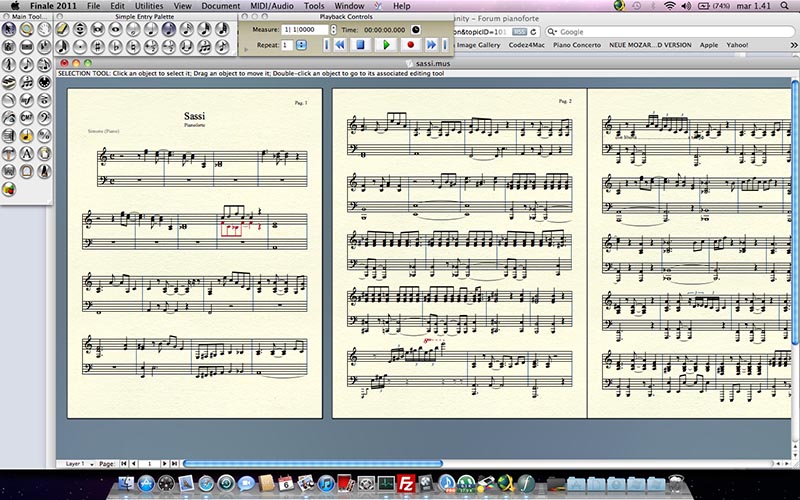
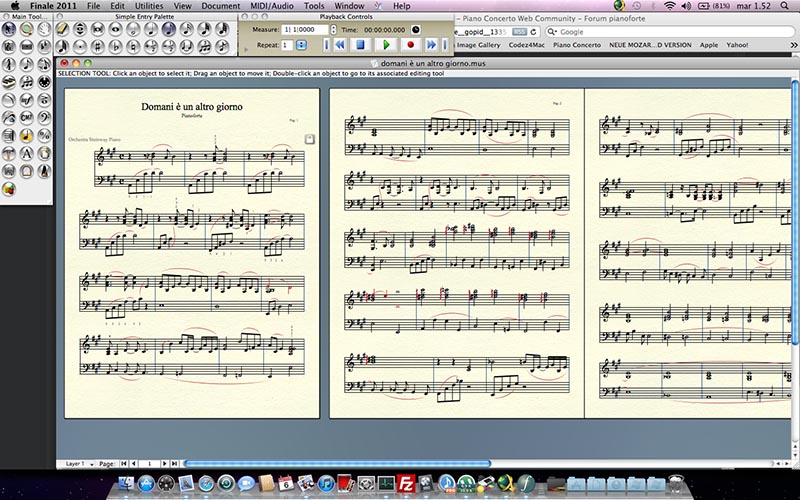
But now I get to the questions. Tonight after dinner, I started writing an arrangement that I had heard from an Ornella Vanoni record, "Sassi", and another one, "Domani è un altro giorno".
Questions:
1. Using Layers is very easy and intuitive, but what if I need more than 4 layers?
2. Irregular groups of 3 are simple because there is a specific key; what about playing quartets in compound time, or groups of 5, 7, 10, 11, 13, 15, 19, etc.? How do you do that?
3. I couldn't find the fermata.
4. Is there a way to insert dynamics without having to write them with the Text Tool? Otherwise, one goes crazy. Like, isn't there a panel where all the dynamics from pppp to fff are located?
5. How do I make the staves smaller so that more than 4 or 5 eleven-line systems can fit on one page?
6. When I tie two unisons, I am doing it with the intention of using a rhythmic tie (tie of value), but perhaps I am using a slur because when I press play, the unison resonates. Where do I find the rhythmic tie?
For now, these are my doubts; I've banged my head against them a little bit searching on the internet as well, but I haven't been able to find much.
Thanks to anyone who wants to answer.
Administrator
Wow, lucky there was the forum !! UP !!!
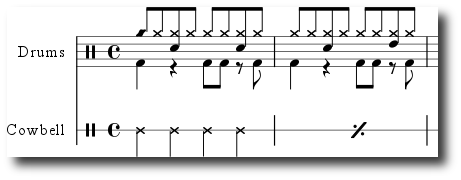
I'm also adding another question... If I wanted to write a score for drums? Are there drum notation symbols to write something like this?
Member
Of course, in general you just need to go to the tools menu, advanced tools, special tools, notehead shape.
But if you select a percussion instrument in the orchestration that normally requires a specific notehead, it will already propose the correct one by default ... then you can always change it
Member
TheSimon wrote:Azz, fortuna che c'era il forum !! UP !!!
In realtà la risposta c'è...ma qui
Ho sbagliato a postare ....
Member
...rifo....
Strictly in order:
What do you mean by more than 4 layers
You have the solution at home: http://www.pianoconc...a-fine-battuta/ (read DiesIrae's tips)
Icon representing a note with an accent on it, or tools-articulations menu: double click on the note, choose not only the accent
Tools menu, expressions, double click on the note and you will find everything. If you use these, they work in playback. The text does not
I didn't quite catch [it], I'll give you a first solution, it might always be useful to you. Select no. of measures (even 10), control-m, type 10, and these 10 measures all remain on the same line. I don't know if I answered.
Select the note and press the letter t
Member
TheSimon, I had read Eagle's response... I thought it was already okay. I hadn't noticed that the topic title was something else
Moderator
TheSimon wrote:what if you need more than 4 layers?
...what do you mean?
Administrator
I hadn't read it... Anyway, by more layers I mean when one wishes to use multiple voices. It seems to me that it is possible to write parts up to 4 voices. In the View - Select Layer menu. What if I needed a fifth voice?
Thanks for the answers Eagle...
Administrator
To question 5.... In the MAC version, control + M doesn't work, nor command + M, nor Alt + M, any ideas?
Administrator
Never mind, found it, on Mac the combination is Shift + Command + M