the situation is this... listen to me...(cit. Totò)
uising the internal recorder of my digital piano (yamaha p140s), i recorded and kept in memory
a piece (not so simple; between studying and repeated mistakes, it took half a day at the time to make a decent performance!). since the timbre of my digital piano is not exceptional, i would like to create a midi track with logic to then assign more beautiful timbres.
to avoid losing another
half day, i was wondering if, by connecting the piano to the audio interface (via midi), it would be possible to put the piano's recorder in PLAY, put logic's recorder in REC and finally create a midi track of the piece in question.
N.B. as the track type, i selected SOFTWARE INSTRUMENT; while the digital piano was in PLAY, i noticed that no midi signal appeared on the display of the bottom bar in logic. Then i tried actually pressing some random notes and the signals arrived and the random notes were effectively recorded as a midi track.
Mmmmm. I, on the other hand, believe that it cannot be done because the MIDI flow routing is reversed in this case. Let me explain better. When playing the keys, the MIDI data arrives at the multiplexer which plays sample x at velocity v and sends a copy of the flow to the MIDI out port. If when you play back a recording of a MIDI flow from the sequencer in the DAW there is no trace of this MIDI data, it simply means that they are not being sent to the MIDI Out output and, unless there is some internal keyboard setting regarding the internal routing of MIDI data, I see it as practically impossible. One possibility, in my opinion, could be this... Since these MIDI data exist, we could also think that they come from a MIDI IN, and a spit-out copy of the MIDI IN signal is sent again to the MIDI THRU line to copy it onto the same layer, making it available to other MIDI instruments. I would try to take the sequencer output from the MIDI THRU. It doesn't hurt to try...
But,.. are you sure it's correct to set Software instr. as the track type? Does External midi only serve to make an external module play? Or can it also receive midi data from a possible external sequencer (in this case, the digital piano)?
(I just threw that out there, but I wanted to give a tiny bit of contribution.. every now and then.)
Still nothing... but the idea should be the right one: midi track but with an external sound generator, my exact situation. Maybe it's just a matter of a few small settings
So the problem lies with the keyboard, because if the MIDI output worked... everything after that would be trivial. In reality, I've seen it done a million times, including the necessary quantization... it's strange that a keyboard like Scala's doesn't work correctly in this regard. I will try to find out more.
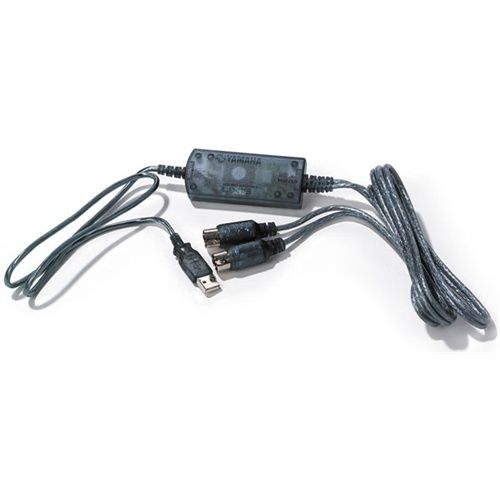
I am using a simple midi-to-midi cable. Would it change anything if it were midi-to-usb? Anyway, I will try to get one tomorrow.
having written the piano part with Finale 2012, I also tried exporting the file after first converting it to a midi file... and in fact, the effect isn't exactly terrible; however, you have to fix the tempo and expression which sometimes slows down, sometimes accelerates, sometimes plays softly, sometimes crescendos, and other times plays loudly... and I don't know how to make these adjustments yet! But I am applying myself seriously.
I believe that keyboard simply does not produce MIDI signals out of the internal sequencer and therefore it is not possible to record the stream onto an external sequencer.
Midi to Midi, Midi to USB, nothing changes if the MIDI data exists they are transported in both cases; if they do not exist they are not transported (in both cases).
I agree... but the instrument's technical sheet seems to say that it produces them. It's a bit absurd that nowadays this function is not available; it should be the default for a digital instrument.
"Is there a sequencer available that allows you to record a performance and play it back at the simple touch of a button? It is also possible to record a second part over the already performed recording using a different voice. The tempo can be set slower or faster during recording or playback. In this way, the sequencer becomes a very useful tool for practice. The P120 is equipped with a PC MIDI interface that allows direct connection to Macintosh® and Windows® computers via a serial port. This interface also allows the use of the MIDI possibilities offered by Yamaha USB MIDI interfaces such as the UX256 and UX96." Where did you read that? The sequencer the manual refers to is the keyboard's internal one. When it emphasizes being able to record a second part over an existing recording, it is still referring to the internal sequencer. Then it talks about a MIDI interface that can be connected via serial port to PC and MAC, but all MIDI interfaces are serial because MIDI data is a serial data stream, so it tells us nothing new. Finally, it tells us that the interface mounted on this keyboard offers the same possibilities as the Yamaha UX256 and UX96 interfaces, which are two perfectly normal interfaces for connecting MIDI hardware that offer IN and OUT.
I would like to try one last thing, after which I will put my soul at peace. I would like to try the acquisition and conversion of the recording via Finale2012. But if there is actually no MIDI data transfer, then perhaps it shouldn't work in this case either.
anyway... could someone tell me how to do it? Which tool should be used?