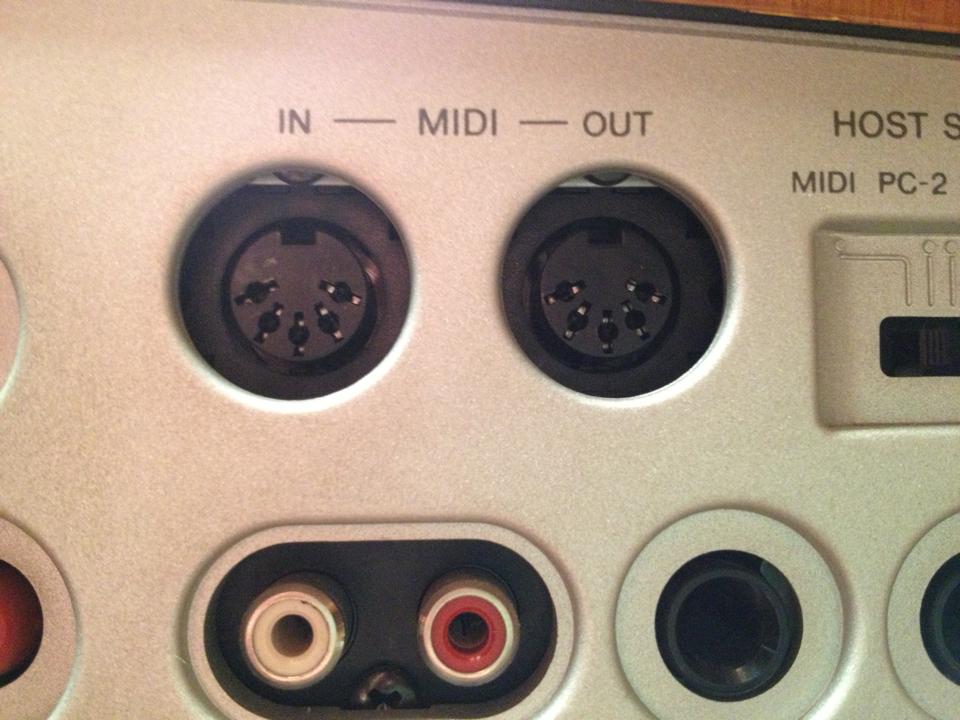
Hi everyone, I can't seem to get out of this problem, I am asking if you could kindly help me. I have a keyboard and I want to play with it in Logic, so I connect it to my Mac via a USB MIDI cable. (So the midi out connectors from the keyboard connect via usb to the mac, right?). Now, in Logic, I go to Software Instrument, but in order to actually use the keyboard, and therefore hear what I am playing, what do I have to do? Choose some device under "Preferences-Audio"?
So there is a problem with the connection between the keyboard and the MIDI interface. Was the MIDI interface provided with drivers to be installed? Is it a Y-cable with two MIDI ports and one USB? Where do you connect the MIDI plugs on the back of the keyboard? Describe every connection in the chain point by point.
I have this cable. I connect the two plugs from the MIDI out of the keyboard and the USB directly to my Mac, right? (The external audio interface I have doesn't have a USB port, so I am forced to go directly to the computer!)
I don't understand how you manage to connect both plugs to the MIDI out of your keyboard... There should only be one MIDI Out, the other is the MIDI In. The MIDI plugs on the cable should be numbered: 1 and 2. You must put plug 1 into the MIDI out of the keyboard, do not connect plug 2, then go to USB on the MAC. To be safe, also try turning the keyboard off and back on after making the connections. Let me know when you have done it. We will resolve this somehow...
How stupid I've been, I put the plugs in both in and out.. So I'll only put the out and see if it works.. I'll be able to tell you in the next few days!! Thank you so much!!
By connecting both plugs, nothing should happen as long as number 1 goes into IN and number 2 goes into OUT. Perhaps you swapped them. Anyway, we are here, let me know.
I would have the same problem too... I have a Yamaha PSR-340 keyboard and I would like to use it with Logic Pro X..... I bought the MIDI cable, connected it to the Mac Air and turned on Logic... on the keyboard I went into the settings and set KbdOut as I had read in another discussion but nothing happens anyway... do you have any advice? thanks in advance
Turning on Logic is not equivalent to making an external MIDI peripheral play and hearing something. Did you create a software instrument track in Logic? Did you load a library in the insert? Have you assigned the MIDI channel of your master keyboard to the library?
NB. The computer is never wrong. If something doesn't work, it is always our fault.
No, Logic does not recognize keyboards; it only recognizes MIDI input data regardless of the source, partly because otherwise drivers would have been necessary, but if nothing corresponds to this MIDI data, it is lost. Without an instrument in the insert, it is as if this data were moving the keys of a piano mechanism that has been pulled out of the soundboard. The keys are pressed, but nothing sounds.
No come va bene, certo! I mean, once you have loaded an instrument, Logic has always recognized the keyboard (its MIDI data) without me having to do anything
the MIDI cable has in and out on one side and is USB on the other.... yes I created the instrument track and put it on the right channel... anyway for the next 10 days I am out of town.. thanks for the answers in the meantime, when I get back home I will try to see if it works again and then I'll let you know!